







































Record your appointment in exora and you never have to remember what was said. It writes the visit up in your language, turns what you need to do into a list of next steps, and offers to update your health record - and every line links back to the exact words your doctor used.
Tap any sentence of the summary, or any key point, next step or warning sign, and you see the words it came from, who said them and when. Tap once more and you can read that moment in the transcript or hear it in the recording.
40 to 80 percent of medical information is forgotten straight away.
Source: Kessels, Journal of the Royal Society of Medicine, 2003
Most of what a doctor tells you is gone before you are out of the building. A review in the Journal of the Royal Society of Medicine put it at 40 to 80 percent of medical information, forgotten straight away (Kessels, 2003). Recording the visit takes that weight off you. A summary makes the recording usable. But a summary is only worth having if you can check it, because the moment it gets one thing wrong you have to wonder about everything else. So that is how we built it.
How do I record my doctor’s appointment?
You start a recording from the appointment in exora, in the iPhone or Android app or in a web browser on a computer. The step-by-step guide walks through it.
Before it begins, exora asks you to confirm that everyone in the room has agreed to be recorded, and gives you simple wording to ask. Asking first is the right thing to do anywhere, and most doctors are glad you want to remember what they said.
When you stop, the recording is transcribed with who said what, and a few minutes later your visit summary is ready.
What do I get after the appointment?
- A short summary of what the visit was about.
- Key points - the diagnosis, the results, the medicine changes, in plain words.
- Next steps - a checklist you can tick off as you go. A follow-up can be added as an appointment in a tap.
- Go to emergency if - the warning signs your doctor told you to watch for, when they gave any.
- Unclear in the recording - anything that could not be pinned down, kept apart rather than guessed.
- Updates for your health record - a new medicine, a result, a diagnosis - waiting for your yes.
Can I get the summary in Spanish, French, Portuguese or Italian?
Yes. The summary is written in the language you use the app in: English, Spanish, French, Portuguese or Italian. It can also work across languages: a visit spoken in Spanish can be written up in English, and the other way round. The quotes stay in the language they were said.
How do I know the summary is right?
Tap a sentence of the summary, a key point, a next step or a warning sign. A panel opens called “Where this came from”. It shows the words that line rests on, word for word, with who said them and when in the recording: “Practitioner said · 3:10”.
-
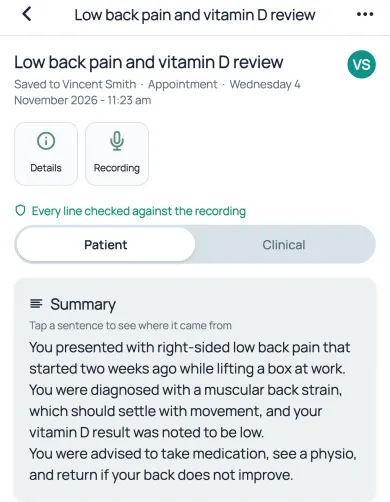
Tap any line of the write-up, including a sentence of the summary.
-
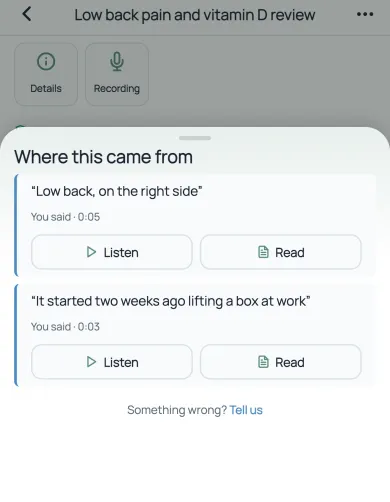
See the exact words it came from, who said them and when.
-
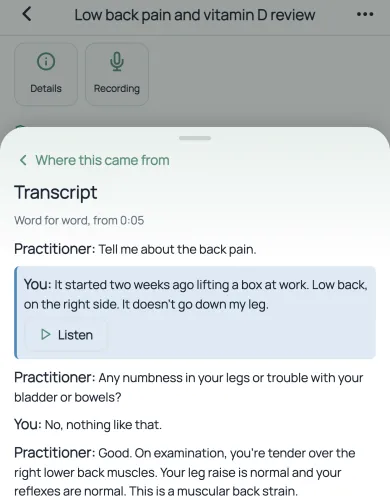
Read that moment in the transcript, or play it.
From there, Read opens the transcript at that moment, with the quoted lines highlighted and a little either side so you can see the context. Listen plays that moment of the original recording, for as long as your copy of the audio is kept (our privacy policy has the detail). The recording is not an AI’s version of events. It is what was said, in the voice that said it.
If a line is wrong, tap “Tell us” and mark it as not right. A line marked that way is never added to your health record.
How exora checks every line
Tracing a line back to its source only works if the line was built from sources in the first place. So the write-up happens in steps that are kept apart on purpose:
- List what was said. One step reads the whole transcript and lists every fact established in the visit, each with its exact quote and the moment it was said.
- Check the quotes are real. Plain code, not AI, confirms that every quote really is in the transcript where it says it is. A quote that cannot be found is dropped, along with the fact resting on it.
- Write from the list only. The summary is written from that list of facts, never straight from the transcript, and each line names the facts it rests on. That is what gives every line its link.
- Check the details. Code checks again that every line cites real facts, and that numbers, doses, dates and left or right match what was said.
- Check it independently. A separate AI check reads each line against the transcript, without seeing how the summary was written. A line it cannot support is removed, not reworded. A line the recording contradicts is moved to “Unclear in the recording”. If the summary paragraph contains anything it cannot support, the paragraph is not shown at all. The same check also looks for important things the summary left out, and adds them with a link to where they were said.
The rule throughout is to leave something out rather than guess. A missing line costs you a tap on the transcript. A wrong one costs you trust in all the others.
The limit: every check compares the summary with the transcript. If the transcription mishears a word, the checks inherit that mistake. That is the reason Read and Listen exist - you can always go back to the recording itself.
Does it change my health record automatically?
No. A visit usually changes something: a new medicine, a dose that goes up, a test result read out, a diagnosis, a referral. exora works out what the visit changes in your health record and asks you one question: update your record?
You see each update before anything is saved, along with the words it rests on. Tick what is right and leave the rest. Nothing goes in until you tick it, and anything you add can be undone later. A result read out without a date asks you when it was, rather than quietly using the date of the visit.
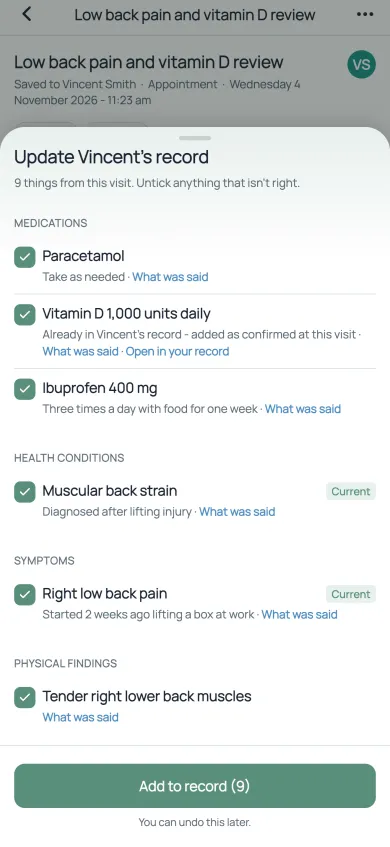
- Untick anything that isn’t right.
- Tap “What was said” to check the words behind each one.
- Nothing is saved until you add it, and you can undo it later.
Once added, each update becomes part of the same record as everything else: the documents you have uploaded, your timeline, your medicines and results. Each entry shows the visit it came from, and the visit shows up on your timeline. Ask exora chat about it later and it can answer from the visit too.
exora is a personal health record app, and recording is one part of it, not a separate app (see everything it does). Every fact from a document already links to the page it came from (how that works). Every fact from a visit now links to the words that were said.
Can my family see what the doctor said?
Yes, if you share it with them. A lot of healthcare is carried by someone other than the patient: a parent at a child’s appointment, an adult child at a parent’s, a partner, a carer. You can record a visit on a family member’s profile, and share it with the people who help care for them.
Someone you share with can read the visit summary and check each line the same way you can. If you give them edit access, they can also review the updates and add them to the record, and the record shows who approved them. Whoever went to the appointment, everyone else can see what was actually said.
Does it replace my doctor’s notes?
No. A visit summary helps you remember and understand your appointment. It does not replace your doctor’s own notes, and it does not give medical advice. If something matters, check it with your doctor - and now you can point to exactly what they said.
We looked hard for another app for patients that links each line of an appointment summary to the exact words and the moment in the recording. As of November 2026, we could not find one.
Common questions
What app can record my doctor’s appointment and summarize it?
exora records the appointment, writes up who said what, and gives you a plain-language summary with key points, next steps and warning signs. Every line, including each sentence of the summary, links to the exact words said and the moment in the recording. See appointment recording in exora.
Is it legal to record my doctor’s appointment?
It depends on where you live, and the rules differ from place to place. The simple, respectful thing is to ask first. exora asks you to confirm that everyone present has agreed before any recording starts.
Is it free?
Yes. Recording appointments is part of the free plan.
Can I record on a computer?
Yes, in a web browser on a computer, as well as in the iPhone and Android apps. Recording in a phone’s web browser is not supported, because phones can pause the browser when the screen locks - use the app on a phone instead.
Record your next appointment, then tap a line. Get started free.
Features described as they work on 4 November 2026. This article is general information about software, not medical advice. Talk to a qualified health professional about your health.